
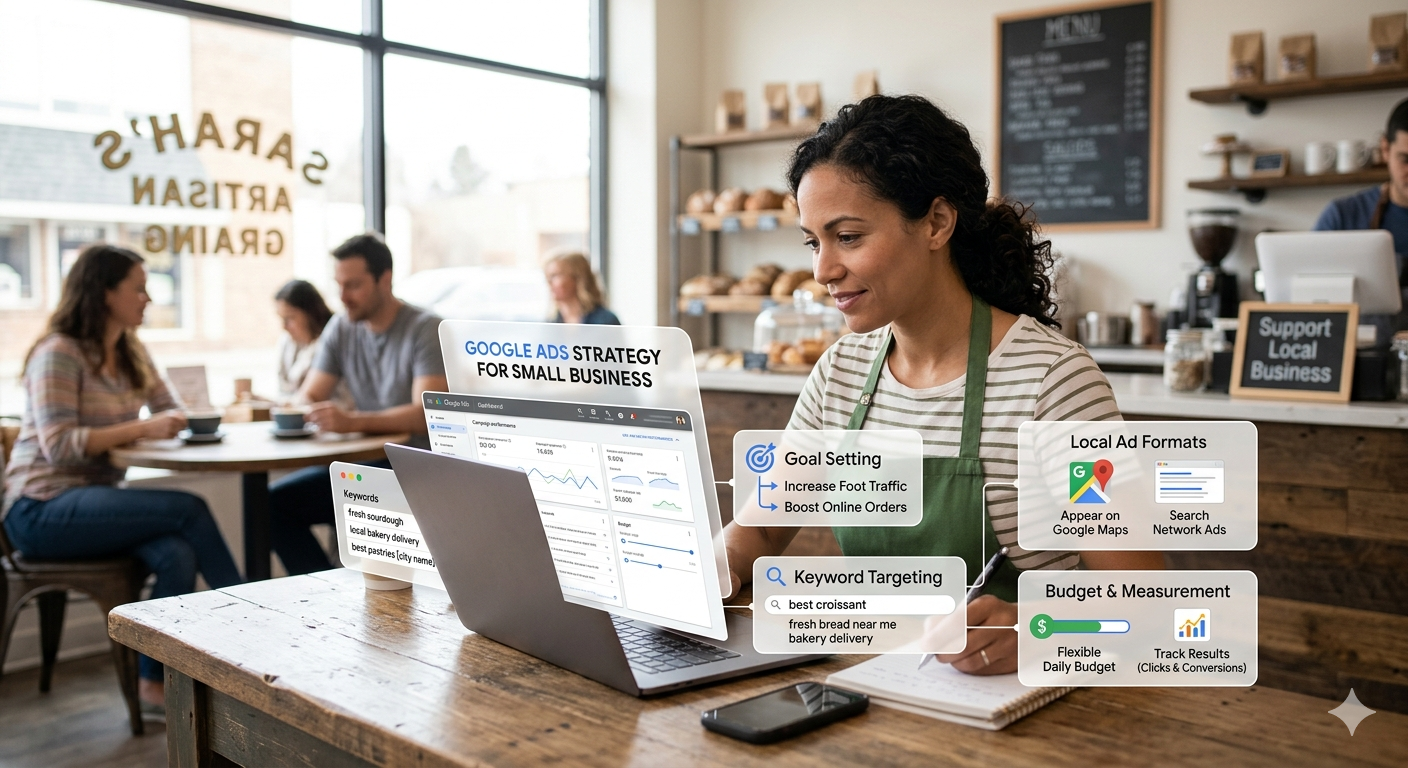
Why a Clear Google Ads Strategy Matters for Small Businesses
A well-defined Google Ads strategy for small business is not just about running ads—it’s about making every rupee count. Small businesses often operate with limited budgets, which means there is very little room for error. Without a clear plan, ad spend can disappear quickly without generating meaningful results.
The key difference between successful campaigns and failed ones lies in decision-making. When you focus on keyword research for Google Ads, choose the right google ads bidding strategies, and implement accurate conversion tracking Google Ads, you start building campaigns based on data rather than assumptions. This approach reduces waste and improves performance over time.
Another important factor is consistency. Many small business owners expect instant results and stop campaigns too early. In reality, Google Ads needs time to gather data, test variations, and optimize performance. A structured approach that includes google ads audience targeting, ongoing testing, and regular optimization creates a strong foundation for long-term success.
Simply put, a clear strategy turns Google Ads from an expense into a reliable growth channel.
Why Small Businesses Struggle with Google Ads
Most small businesses don’t fail because of budget—they fail because of poor setup. Many jump into campaigns without a clear structure, expecting quick results. Google Ads doesn’t reward guesswork. It rewards relevance, data, and consistency.
Common issues include:
- Weak keyword research for Google Ads
- Choosing the wrong google ads bidding strategies
- Missing or incorrect conversion tracking Google Ads setup
- Broad, unfocused targeting that attracts the wrong audience
These mistakes lead to wasted spend and low returns. When ads reach users with low intent, clicks increase but conversions drop.
|
Issue |
What Happens |
Result |
|
Weak keyword research |
Ads show for irrelevant searches | Wasted budget |
|
Wrong bidding strategy |
Paying for clicks, not conversions | Low ROI |
| No conversion tracking | No data to optimize |
Blind decisions |
| Broad targeting | Wrong audience clicks |
Low conversion rate |
Real-World Example
A local home cleaning service initially targeted the keyword “cleaning services.”
Result:
- High impressions
- Very low conversions
The problem was clear—low intent traffic. People searching that term were not always ready to book.
After refining keywords to:
- “home cleaning service near me”
- “same day house cleaning [city]”
The business started attracting users who needed immediate service. Within two weeks, conversions improved noticeably without increasing the budget.
Key Insight
Intent beats volume every time.
Target fewer people—but target the right people. That’s where real ROI begins.
Step 1: Keyword Research for Google Ads
Keyword research is the foundation of every successful campaign. If your keywords are wrong, even the best ads will fail. Strong keyword research for Google Ads helps you reach users who are ready to take action, not just browse.
Keyword Strategy Comparison
|
Keyword Type |
Traffic | Cost | Conversion Rate |
|
Broad keywords |
High | High | Low |
| Long-tail keywords | Medium | Low |
High |
| Intent-based keywords | Targeted | Optimized |
Very High |
Focus on Search Intent
Not all keywords are equal. Understanding intent makes a huge difference in performance.
There are three main types:
- Informational – Users want to learn (e.g., “what is a good laptop”)
- Commercial – Users compare options (e.g., “best laptops under 70000”)
- Transactional – Users are ready to buy (e.g., “buy gaming laptop online”)
For small businesses, transactional keywords deliver faster and more profitable results.
Search Intent Breakdown
|
Keyword Type |
Example | User Intent | Value for Business |
|
Informational |
what is a good laptop | Learning | Low |
| Commercial | best laptops under 70000 | comparison |
Medium |
| Transactional | buy gaming laptop online | Ready to buy |
High |
SEO Insight: Transactional keywords drive maximum ROI
Real-World Example
A small online electronics store initially targeted:
- “laptops”
Result:
- High traffic
- Poor conversions
After refining their keyword strategy to:
- “buy gaming laptop under 70000”
- “best laptop for students India”
They noticed:
- Lower cost per click (CPC)
- Higher conversion rate
The traffic became more relevant, and sales improved without increasing budget.
Practical Tip
Use reliable tools like:
- Google Keyword Planner
- Competitor keyword analysis
Avoid generic keywords. They attract clicks but not customers. Specific, intent-driven keywords bring buyers—not browsers.
Step 2: Campaign Structure That Actually Works
Campaign structure directly controls performance. A clean structure helps Google understand your ads, improves relevance, and reduces wasted spend. When everything aligns—keywords, ads, and landing pages—you get better results with the same budget.
Keep It Simple and Focused
Ideal Campaign Structure
|
Level |
Purpose | Best Practice |
|
Campaign |
Goal (Leads/Sales) | One goal per campaign |
| Ad Group | Keyword theme |
10–15 related keywords |
| Ads | Match intent |
Highly relevant messaging |
Follow a clear hierarchy:
- Campaign → Goal-based (leads, sales, website traffic)
- Ad Group → Keyword theme (closely related terms)
- Ads → Match intent (specific to each keyword group)
Avoid mixing unrelated keywords in one ad group. That creates confusion for both users and Google’s algorithm.
Real-World Example
A digital marketing agency ran campaigns with a single ad group containing 50+ keywords.
Result:
- Poor ad relevance
- Low Quality Score
- Higher cost per click
The ads didn’t match user intent properly, so performance dropped.
Poor vs Optimized Structure
|
Factor |
Poor Setup | Optimized Setup |
|
Keywords per ad group |
50+ mixed | 10–15 focused |
|
Ad relevance |
Low |
High |
| CTR | Low |
High |
| CPC | Expensive |
Lower |
After restructuring:
- They created smaller, tightly themed ad groups
- Each group had 10–15 closely related keywords
- Ads were rewritten to match specific intent
Result:
- CTR improved significantly
- Cost per click reduced
- Quality Score increased
Key Insight
Clear structure leads to better targeting, better relevance, and lower costs.
When your campaign is organized, Google rewards you—and your budget works harder.
Step 3: Google Ads Bidding Strategies Explained
Choosing the right google ads bidding strategies can either control your costs or drain your budget quickly. Bidding tells Google how you want to spend your money—and what results matter most to your business.
Bidding Strategy Comparison
|
Strategy |
Best For | Risk Level | Result |
|
Manual CPC |
Beginners | Low | Full control |
|
Maximize Clicks |
Traffic | Medium | Low conversion |
| Maximize Conversions |
Leads/Sales |
Low |
High ROI |
| Target CPA | Lead cost control | Medium |
Stable CPL |
| Target ROAS | Revenue focus | High |
Best for eCommerce |
Types of Google Ads Bidding Strategies
Here are the most commonly used options:
- Manual CPC – You control how much you pay per click
- Maximize Clicks – Focuses on getting the most traffic
- Maximize Conversions – Aims to generate more actions (leads/sales)
- Target CPA (Cost Per Acquisition) – Tries to get conversions at a fixed cost
- Target ROAS (Return on Ad Spend) – Focuses on revenue, not just conversions
Each strategy serves a different goal. Choosing the wrong one can bring the wrong results.
Real-World Example
A local bakery started with Maximize Clicks.
Result:
- High traffic
- Very low sales
The campaign brought visitors, but most of them had low buying intent.
After switching to Maximize Conversions:
- Fewer clicks
- More orders
Google began prioritizing users more likely to purchase, not just click.
Key Insight
Traffic doesn’t equal revenue. Conversions do.
Start with a clear goal. If your goal is sales or leads, choose a bidding strategy that focuses on conversions—not just clicks.
Step 4: Smart Bidding Google Ads (When It Works)
Smart bidding Google Ads uses machine learning to adjust bids in real time. It analyzes multiple signals to improve performance and increase conversions without manual effort.
Smart Bidding Readiness Checklist
|
Requirement |
Status Needed |
|
Conversion tracking |
Must be active |
|
Data volume |
30–50+ conversions |
| Campaign stability |
Minimal changes |
| Time |
2–3 weeks learning |
It considers:
- Device
- Location
- Time of day
- User behavior
This makes bidding more efficient—but only when supported by reliable data. Many advertisers expect instant improvements, but smart bidding requires a learning phase. During this phase, performance may fluctuate as the system gathers insights.
When It Works Best
Smart bidding performs well when:
- You have consistent conversion data
- Your conversion tracking Google Ads setup is accurate
Without enough data, the system struggles to make the right decisions. Avoid making frequent changes during this period, as it resets learning.
Real-World Example
An eCommerce store switched to Target ROAS too early.
Result:
- Campaign performance dropped
- Budget was wasted
After collecting 50+ conversions:
- Performance improved significantly
- Revenue stabilized
Key Insight: Timing and data quality matter more than automation itself.
Step 5: Conversion Tracking Google Ads Setup
Without tracking, you’re flying blind. You won’t know what’s working or where to optimize. Proper tracking transforms your campaigns from guesswork into data-driven decisions.
What You Should Track
- Form submissions
- Purchases
- Phone calls
Tracking helps Google optimize campaigns based on real user actions. You should also assign values to conversions whenever possible to measure ROI more accurately.
What to Track
|
Conversion Type |
Why It Matters |
|
Form submissions |
Lead generation |
| Purchases |
Revenue tracking |
| Phone calls |
High intent leads |
Real-World Example
A service business ran ads without tracking and assumed ads were failing.
After setting up tracking:
- They found most leads came from mobile users
- They improved mobile experience
Before vs After Tracking
|
Metric |
Before Tracking |
After Tracking |
|
Decision making |
Guesswork | Data-driven |
| ROI visibility | Unknown |
Clear |
| Optimization | Limited |
Accurate |
Result:
Leads increased by 35%
Insight: Accurate data reveals hidden opportunities and prevents wrong decisions.
Step 6: Google Ads Audience Targeting
Targeting everyone increases cost and reduces efficiency. Strong google ads audience targeting helps you reach users who are more likely to convert.
Audience Types
|
Audience Type |
Description | Best Use Case |
|
In-market |
Ready to buy | High conversions |
| Custom audience | Based on behavior |
Targeted reach |
| Remarketing | Past visitors |
Highest ROI |
Types of Audience Targeting
- In-market audiences
- Custom audiences
- Remarketing audiences
Layering audiences with keywords improves precision and campaign performance.
Real-World Example
A fitness coach targeted a broad “health” audience.
After refining to:
- “weight loss programs”
- “home workout plans”
Result:
- Better engagement
- Lower cost per lead
Key Insight: The more specific your audience, the better your results and cost efficiency.
Step 7: Google Ads Lead Generation Strategy
Clicks don’t generate revenue—leads do. A strong google ads lead generation strategy focuses on converting users, not just attracting them.
CTA Performance Comparison
|
CTA Type |
Example | Conversion Rate |
|
Generic |
Learn More | Low |
| Action-based | Book Free Consultation |
High |
| Urgency-driven | Limited Offer Today |
Very High |
What Works
- A clear and valuable offer
- Strong, action-driven CTA
- Fast and mobile-friendly landing page
Your landing page should match the ad message and remove distractions to improve conversion rates.
Real-World Example
A real estate agent changed the CTA from:
- “Learn More”
To:
- “Book Free Site Visit”
Result:
- Leads doubled
Insight: Small messaging improvements can significantly increase conversions.
Step 8: Improve Google Ads Quality Score
Your Quality Score directly impacts your ad costs and visibility. A higher score means better performance at a lower cost.
Quality Score Factors
| Factor | Impact Level | Optimization Tip |
|
Ad relevance |
High | Match keywords |
|
CTR |
High |
Improve ad copy |
|
Landing page |
High |
Fast + relevant |
How to Improve It
- Write highly relevant ads
- Match keywords with ad copy
- Improve landing page experience
Consistency between keyword, ad, and landing page builds trust with both users and Google.
Real-World Example
A business optimized its landing page speed and content.
Result:
- Higher Quality Score
- Lower CPC
Insight: Better user experience leads to better ad performance and lower costs.
Step 9: Geo Targeting Google Ads
For small businesses, location targeting is essential. Geo targeting Google Ads ensures your ads reach the right audience in the right place.
Broad vs Narrow Targeting
|
Targeting Type |
Reach | Cost | ROI |
|
State-level |
High | High |
Low |
| City-level | Medium | Medium | Better |
| Radius (5–10 km) | Targeted | Low |
High |
How to Use It
- Target specific cities or areas
- Exclude locations that don’t convert
- Adjust bids based on performance
You can also analyze location reports to identify high-performing regions.
Real-World Example
A local restaurant targeted an entire state.
Result:
- Irrelevant traffic
- Wasted budget
After narrowing to a 5 km radius:
- Foot traffic increased
- ROI improved
Insight: Focused targeting leads to better engagement and higher returns.
Step 10: Location Targeting Google Ads Best Practices
Effective location targeting Google Ads goes beyond selecting a city. It requires continuous refinement based on performance data.
Optimization Checklist
|
Action |
Benefit |
|
Use presence targeting |
Real local users |
| Exclude poor locations |
Save budget |
| Adjust bids by location |
Maximize ROI |
Best Practices
- Use “presence” targeting (users physically in location)
- Apply radius targeting for local reach
- Set location-based bid adjustments
You can also customize ad copy based on location to increase relevance.
Pro Tip
Exclude low-performing areas regularly. This reduces waste and improves efficiency instantly.
Step 11: Continuous Optimization
Successful campaigns are never static. Ongoing optimization keeps performance strong and costs under control.
Weekly Optimization Checklist
|
Task |
Frequency |
Impact |
|
Keyword review |
Weekly | High |
|
Ad testing |
Weekly |
High |
| Bid adjustments | Weekly |
Medium |
| Search term analysis | Weekly |
High |
What to Do Weekly
- Review keyword performance
- Test new ad variations
- Adjust bids and budgets
Also monitor search terms to discover new opportunities and eliminate irrelevant traffic.
A/B Testing Example
|
Ad Version |
CTR | Result |
|
Ad A |
2.5% | Average |
| Ad B | 3.8% |
Better |
| Ad C | 5.2% |
Winner |
Real-World Example
An online store tested three ad variations.
One version:
- Increased CTR by 40%
They scaled the winning ad and paused the others.
Final Insight: Consistent testing and optimization drive long-term growth and profitability.
Frequently Asked Questions (FAQs)
1. What is the best Google Ads strategy for small business?
Start with strong keyword research, use manual bidding, enable conversion tracking, and optimize regularly. Scale using smart bidding after collecting enough data.
2. How much should a small business spend on Google Ads?
It depends on your industry and goals. Many small businesses start with a controlled daily budget and scale based on performance.
3. What is smart bidding in Google Ads?
Smart bidding uses machine learning to optimize bids for conversions or value. It works best when campaigns have enough historical data.
4. Why is keyword research important for Google Ads?
It ensures your ads appear for relevant searches. Good keywords bring high-intent users who are more likely to convert.
5. How can I improve Google Ads Quality Score?
Focus on: Relevant keywords, Strong ad copy, and Fast, user-friendly landing pages
6. What is conversion tracking in Google Ads?
It tracks actions like purchases or leads, helping you measure campaign success and optimize performance.
7. Which bidding strategy is best for beginners?
Manual CPC works best initially. It gives control and helps you understand performance before switching to automation
8. How does geo targeting help small businesses?
It ensures ads show only in relevant locations, reducing wasted spend and improving local conversions.
9. What is the difference between geo targeting and location targeting?
Both relate to location, but geo targeting focuses on user location, while location targeting includes intent and geographic settings.
10. How long does it take to see results from Google Ads?
You may see initial data within days, but meaningful optimization usually takes 2–4 weeks.

Signed up with wink24hrlogin! The 24/7 availability is a major plus for me. Hope this one is good give it a go and let me know what you think ! Check out the fun here: wink24hrlogin