Most businesses don’t have a traffic problem. They have a conversion problem.
You can spend ₹50,000 on ads and still get zero leads—or generate consistent, high-quality leads with half that budget. The difference isn’t luck. It comes down to strategy, targeting, and execution.
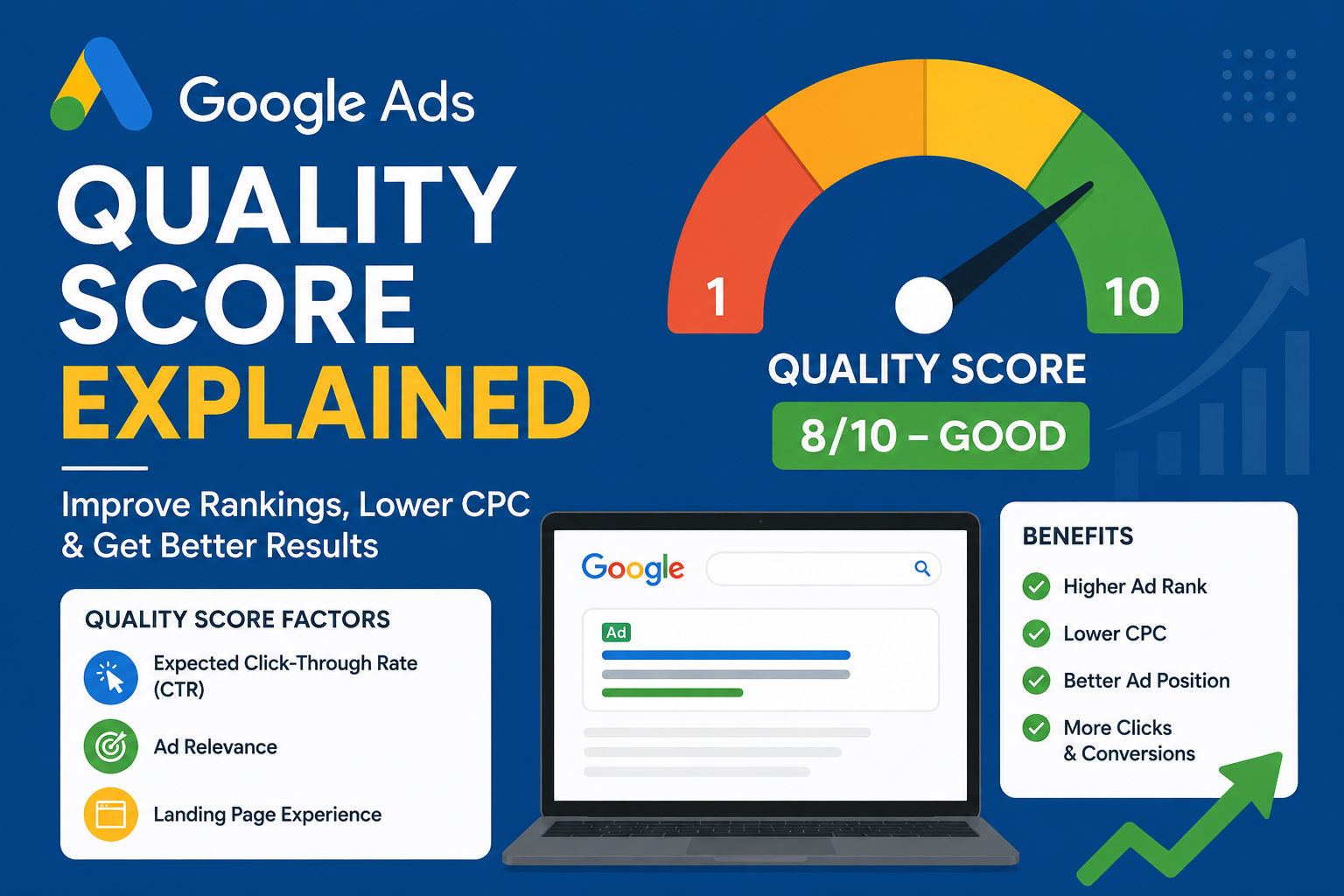
According to Google Ads Help Center, campaign performance depends on three critical factors:
- Ad relevance
- Expected click-through rate (CTR)
- Landing page experience
If even one of these breaks, your entire funnel underperforms. For example, a well-written ad won’t convert if it leads to a slow or confusing landing page. Similarly, targeting the wrong keywords brings clicks—but not qualified leads.
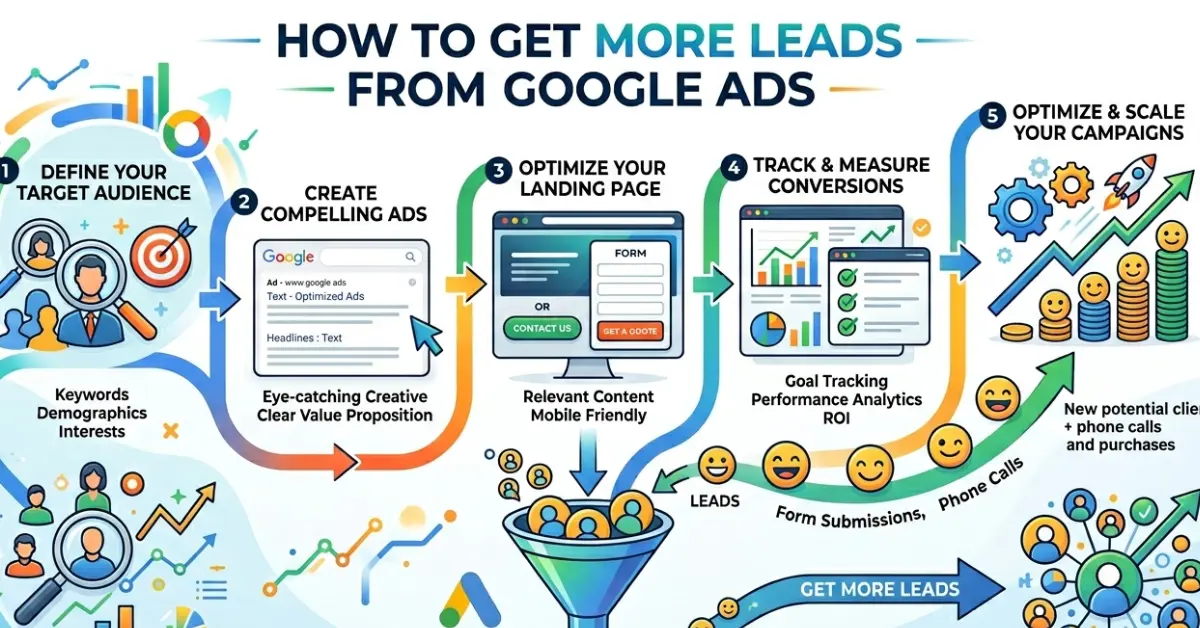
To succeed with how to get more leads from Google Ads, you need alignment across every stage. Your keywords must match user intent, your ads must address real problems, and your landing page must guide users toward a clear action.
This guide will show you how to fix these gaps, improve conversion rates, and build a predictable lead generation system using Google Ads—not just drive traffic, but turn it into real business results.
Why Your Google Ads Campaign Is Not Generating Leads
Before you try to fix your campaign, you need to identify what’s actually going wrong. Most advertisers jump into optimization without diagnosing the root issue—and that leads to wasted budget and frustration.
Common Problems
|
Problem |
Root Cause | Result |
|
High clicks, low leads |
Wrong intent keywords |
Wasted budget |
|
Low CTR |
Weak ad copy | Poor visibility |
| High bounce rate | Bad landing page | Lost conversions |
| Low lead quality | Poor targeting |
No sales |
These issues don’t happen randomly. They usually come from a lack of alignment between what users search for and what your ads deliver.
For example, if you target broad keywords like “digital marketing,” you’ll attract users who are just exploring—not ready to convert. Similarly, even a great ad won’t perform if it leads to a slow, cluttered, or irrelevant landing page.
According to Google Ads Help Center, Google evaluates campaigns based on relevance, expected CTR, and landing page experience. If your campaign fails in any of these areas, your performance drops—and your cost per lead increases.
In simple terms: Google doesn’t reward how much you spend. It rewards how well your campaign matches user intent and delivers a good experience.
Step 1: Focus on High-Intent Keywords (Not Traffic)
If you want to generate leads with Google Ads, stop chasing traffic for the sake of numbers. Traffic doesn’t pay the bills—intent does.
Many advertisers make the mistake of targeting high-volume keywords, assuming more clicks will bring more leads. In reality, broad keywords often attract users who are just researching, not ready to take action.
Keyword Intent Framework
|
Type |
Example | Intent | Result |
|
Informational |
“what is google ads” | Low | ❌ |
| Commercial | “best google ads agency” | Medium |
⚠️ |
| Transactional | “hire google ads expert” | High |
✅ |
Transactional keywords signal clear buying intent. These users are actively looking for a solution and are far more likely to convert.
For example, someone searching “what is Google Ads” wants information. But someone searching “hire Google Ads expert for small business” is ready to take action.
According to Google Ads Help Center, aligning keywords with user intent improves ad relevance and overall campaign performance.
Focus on fewer, high-intent keywords rather than a large list of broad terms. This approach reduces wasted spend, improves lead quality, and forms the foundation of a successful google ads lead generation strategy.
Real Case Study (Service Business)
A local agency initially targeted a broad keyword:
- “digital marketing”
Problem
- High traffic but very low conversions
- Visitors were mostly in the research phase, not ready to hire
This created a classic issue: lots of clicks, but no real business impact.
Fix
The agency refined its targeting and switched to a high-intent keyword:
- “hire google ads expert for small business”
This single change aligned the campaign with users who were ready to take action, not just explore options.
Results in 45 Days
|
Metric |
Before |
After |
|
Cost Per Lead (CPL) |
₹1,200 | ₹480 |
| Conversion Rate | 3.2% |
8.7% |
| Lead Quality | Low |
High |
What Changed (Key Insight)
The improvement didn’t come from increasing budget or changing bidding strategies. It came from matching keyword intent with user expectations.
According to Google Ads Help Center, better alignment between keywords, ads, and landing pages directly improves campaign performance.
This example proves a simple truth:
Better intent = Better leads.
And that’s the foundation of a strong, scalable google ads lead generation strategy.
Step 2: Intent-Based Campaign Structure (Modern Approach)
Stop grouping random keywords into one ad group. That approach confuses both users and Google.
If you want consistent google ads lead generation, structure your campaigns based on user intent. Each ad group should target a specific mindset—what the user wants at that exact moment.
Smart Campaign Structure
|
Campaign |
Ad Group | Focus |
|
Lead Gen |
Services | Hire intent |
| Lead Gen | Pricing |
Cost-focused |
| Lead Gen | Local |
Near-me searches |
This structure allows you to:
- Write highly relevant ads
- Match landing pages with intent
- Improve Quality Score
For example, someone searching “google ads pricing” expects cost details—not a generic service page. When your ad and landing page match that expectation, conversions increase.
According to Google Ads Help Center, better campaign structure improves ad relevance and expected CTR—two key ranking factors.
Real Example
A business restructured its campaigns by separating:
- Hiring intent
- Pricing intent
- Local searches
Results
|
Metric |
Before | After |
|
CTR |
3% | 6.5% |
| Cost Per Lead | High |
↓ 30% |
| Ad Relevance | Low |
High |
Key Insight
When you align keywords → ads → landing pages by intent, your entire funnel becomes more efficient.
Better structure doesn’t just improve performance—it reduces wasted spend and builds a scalable google ads lead generation strategy.
Step 3: Write Ads That Sell (Not Just Attract Clicks)
Most Google Ads fail for one simple reason—they sound identical.
Users scroll past generic ads like:
“Best Services | Affordable Price | Contact Us”
If your ad doesn’t stand out or speak to a real problem, it won’t convert—no matter how good your targeting is.
To generate leads with Google Ads, your ad must do more than attract clicks. It must pre-sell the solution.
High-Converting Ad Framework
|
Element |
What to Do |
|
Pain Point |
Address a real problem your audience faces |
| Outcome |
Promise a clear, specific result |
| CTA |
Give a direct and compelling next step |
This framework works because it aligns with how users think:
Problem → Solution → Action
Example
Weak:
“Best Google Ads Services”
Strong:
“Struggling With High CPC? Get 3X More Leads in 30 Days”
The second ad works because it:
- Calls out a specific pain point
- Offers a measurable benefit
- Creates curiosity and urgency
Real Example
A business tested a simple CTA change:
- “Contact Us” → “Get Free Strategy Call”
Results
|
Metric |
Before | After |
|
CTR |
Baseline | +27% |
| Leads | Baseline |
+18% |
| Engagement | Average |
Higher |
Key Insight
Small changes in ad copy can produce significant improvements in performance. You don’t need a complete overhaul—just clearer messaging.
According to Google Ads Help Center, ads that closely match user intent and clearly communicate value tend to achieve higher CTR and better conversion rates.
If you want to master how to get more conversions Google Ads, start by writing ads that solve problems—not just describe services.
Step 4: Use Custom Intent Audiences (Hidden Advantage)
Most advertisers ignore this feature—and that’s exactly why it works so well.
If you want better google ads lead generation, you need to target users who already show buying signals. That’s where custom intent audience Google Ads gives you an edge.
Instead of targeting broad demographics, you reach people based on what they actively search and browse online.
How It Works
|
Signal |
Example |
|
Search behavior |
“best CRM software” |
| Competitor visits |
Visiting rival websites |
| Buying intent |
Pricing comparisons |
This allows you to connect with users who are already in the consideration or decision stage, not just discovering options.
For example, someone comparing pricing pages or searching for alternatives is much closer to converting than someone reading a general blog.
According to Google Ads Help Center, audience targeting based on user behavior improves relevance and campaign efficiency.
Real Example
A SaaS company implemented custom intent audiences targeting:
- Competitor brand searches
- Product comparison queries
Results
|
Metric |
Impact |
|
Cost Per Lead (CPL) |
↓ 42% |
| Lead Quality |
Significantly improved |
| Conversion Rate |
Increased |
Key Insight
When you target users based on intent signals, you stop wasting budget on cold audiences.
Instead of chasing traffic, you reach ready buyers, which is the fastest way to improve performance and scale your google ads lead generation strategy.
Step 5: Landing Page Optimization (Where Leads Are Won)
Your ads bring traffic.
Your landing page decides whether that traffic turns into leads.
Many campaigns fail not because of poor ads, but because the landing page doesn’t deliver what users expect. If there’s a mismatch, users leave—and you lose money.
To succeed in landing page optimization for Google Ads, focus on clarity, speed, and trust.
Google Ads Landing Page Best Practices
|
Element |
Best Practice |
|
Headline |
Match ad intent exactly |
| Speed |
Load in under 3 seconds |
| Form |
Keep it short and simple |
| Trust |
Add testimonials, reviews, proof |
A good landing page should answer three questions instantly:
- Am I in the right place?
- What do I get?
- What should I do next?
According to Google Ads Help Center, landing page experience directly impacts Quality Score and conversion performance.
Real Case Study
A service company optimized its landing page by reducing friction.
Change Made
- Reduced form fields from 7 → 3
Results
|
Metric |
Impact |
|
Conversion Rate |
+38% |
| Bounce Rate |
Decreased |
| Lead Volume |
Increased |
Key Insight
Every extra step creates friction. The more effort users need to convert, the fewer leads you get.
Strong google ads landing page best practices focus on simplicity, speed, and relevance—because even the best ads can’t save a poor landing page.
Step 6: Conversion Rate Optimization (CRO)
Small changes can drive big growth—but only when you test with intent and consistency.
If you want to improve conversion rate Google Ads, you need to focus on optimizing the user journey after the click. Many advertisers invest heavily in traffic but ignore what happens on the landing page. That’s where most conversions are won or lost.
CRO Testing Table
|
Element |
Variation A | Variation B |
|
CTA |
Submit | Get Free Audit |
| Headline | Generic |
Benefit-focused |
Instead of making random changes, follow a structured testing approach. Test one variable at a time, measure results, and scale what works. This reduces guesswork and improves performance over time.
Real Example
A business tested a simple CTA change:
- “Submit” → “Get Free Consultation”
Results
|
Metric |
Impact |
|
Conversion Rate |
+22% |
|
User Engagement |
Increased |
This highlights how small improvements can significantly boost google ads conversion optimization.
Unique Framework: 3-Level Lead Quality System
Most campaigns focus on quantity. High-performing campaigns focus on quality and intent.
Level 1: Volume
- Total number of leads generated
Level 2: Intent
- Are users genuinely interested or just exploring?
Level 3: Qualification
- Do they meet your business criteria (budget, timeline, authority)?
Example
A B2B company added a simple qualification filter:
- “Minimum budget required” field in the form
Results
|
Metric |
Impact |
|
Leads |
↓ 20% |
| Sales |
↑ 35% |
That’s how you improve lead quality Google Ads—by focusing on the right leads, not just more leads.
Step 7: Track What Matters (Data = Growth)
Without tracking, you’re not optimizing—you’re guessing.
Many advertisers focus on clicks and impressions, but those metrics don’t tell you what’s actually driving results. To build a profitable google ads lead generation strategy, you need to track what happens after the click.
According to Google Analytics, analyzing user behavior helps you identify where users drop off, which pages underperform, and what needs improvement.
Key Metrics
|
Metric |
Purpose |
| Conversion Rate | Measures how effectively traffic turns into leads |
| CPL (Cost Per Lead) | Tracks cost efficiency of campaigns |
| Bounce Rate | Indicates landing page experience issues |
| Lead Quality |
Reflects how likely leads convert into customers |
Why This Matters
For example, if your CTR is high but conversions are low, the issue likely lies in your landing page or offer—not your ads. Similarly, a low CPL doesn’t always mean success if the leads are unqualified.
Tracking these metrics helps you:
- Identify weak points in your funnel
- Allocate budget more effectively
- Improve overall google ads conversion optimization
Key Insight
Data removes assumptions. When you track the right metrics, you make decisions based on evidence—not guesswork.
The more accurately you track performance, the faster you can scale campaigns that generate high-quality leads, not just clicks.
Step 8: Smart Bidding Strategy
Automation can improve performance—but only when it has the right data.
If you switch to automated bidding too early, Google doesn’t have enough signals to optimize properly. That often leads to wasted spend instead of better results. To succeed with google ads conversion optimization, you need to choose the right bidding strategy at the right stage.
Bidding Comparison
|
Strategy |
Best For |
|
Manual CPC |
Beginners and testing phase |
| Maximize Conversions |
Scaling campaigns with some data |
| Target CPA |
Advanced campaigns with consistent conversions |
Each strategy serves a purpose. Manual CPC gives you control in the early stage. As data builds, automation can take over and optimize faster than manual adjustments.
According to Google Ads Help Center, automated bidding works best when campaigns have sufficient conversion data to learn from.
Real Example
A campaign initially used Manual CPC to gather data. After reaching 50+ conversions, it switched to Target CPA.
Results
|
Metric |
Impact |
|
Cost Per Acquisition |
↓ 25% |
|
Conversion Stability |
Improved |
| Optimization Efficiency |
Higher |
Key Insight
Automation is powerful—but timing matters.
Use manual bidding to learn, then switch to smart bidding to scale. That’s how you balance control and efficiency in a successful google ads lead generation strategy.
Step 9: Weekly Optimization System
Winning campaigns don’t stay static—they evolve every week.
Many advertisers set up campaigns and leave them running. That approach leads to wasted spend and missed opportunities. To succeed with google ads lead generation, you need a consistent optimization routine.
Weekly Checklist
|
Task |
Action |
| Search terms | Add negative keywords to remove irrelevant traffic |
|
Ads |
Test new copies and messaging variations |
| Keywords |
Pause low-performing or expensive terms |
This process helps you refine targeting, improve ad relevance, and control costs over time.
Real Example
A business shifted from monthly optimization to a weekly routine.
Results
|
Metric |
Impact |
| Overall Performance | +20% (within 90 days) |
| Cost Efficiency |
Improved |
| Lead Quality |
Higher |
These are essential google ads campaign optimization tips that compound over time.
Advanced Strategy: Full Funnel Lead Generation
If you want to scale beyond basic campaigns, you need a system—not just tactics.
Funnel Strategy
|
Stage |
Focus |
|
Awareness |
Blog content and informational keywords |
| Consideration |
Comparisons, case studies |
| Decision |
High-intent landing pages and offers |
This approach allows you to capture users at different stages and nurture them toward conversion.
Real Example
A SaaS brand implemented a full-funnel strategy with remarketing.
Results
|
Metric |
Impact |
|
Remarketing Conversions |
3X increase |
|
Cost Per Lead |
Reduced over time |
| Funnel Efficiency |
Improved |
This creates a sustainable and scalable google ads lead generation strategy.
Common Mistakes to Avoid
| Mistake |
Impact |
| Broad keywords |
Wasted ad spend |
| No CRO | Low conversion rates |
| No tracking | Poor decision-making |
Final Insight
Consistency beats quick fixes.
When you optimize regularly, test continuously, and align your funnel, your campaigns don’t just improve—they compound into a predictable lead generation system.
Final Thoughts
Getting more leads from Google Ads isn’t about increasing your budget—it’s about improving how your entire system works together.
Many advertisers try to fix performance by spending more, but that rarely solves the real problem. The real growth comes from alignment—making sure every part of your campaign works toward the same goal.
Focus on:
- Better targeting – Reach users with clear buying intent
- Better messaging – Speak directly to real problems and outcomes
- Better experience – Deliver fast, relevant, and simple landing pages
When these elements align, your campaigns stop feeling unpredictable. Instead, they become consistent, scalable, and profitable.
According to Google Ads Help Center, improving relevance and user experience directly impacts performance and cost efficiency.
Quick Recap
|
Area |
Focus |
|
Keywords |
High intent targeting |
| Ads |
Problem-solving messaging |
|
Landing Page |
Fast, clear, and conversion-focused |
| CRO | Continuous testing and improvement |
|
Tracking |
Data-driven decision making |
Final Insight
Success with google ads lead generation doesn’t come from one big change—it comes from small, consistent improvements across your funnel.
Get the fundamentals right, optimize regularly, and your campaigns will not only generate more leads—but better ones.
Frequently Asked Questions (FAQ)
1. How to generate leads with Google Ads?
Focus on high-intent keywords, compelling ad copy, and optimized landing pages. Align your keywords, ads, and pages with user intent to improve conversions.
2. What is a good conversion rate for Google Ads?
Most industries see conversion rates between 3%–7%, but well-optimized campaigns can exceed 10% or more, especially with strong targeting and landing pages.
3. How to improve lead quality Google Ads?
Use negative keywords, refine audience targeting, and add qualification fields like budget or timeline in your forms to filter out low-quality leads.
4. Why am I getting clicks but no leads?
This usually happens due to poor landing page experience or mismatched intent. Your ad may attract users, but your page fails to convert them.
5. How to improve conversion rate Google Ads?
Continuously test headlines, CTAs, layouts, and offers. Even small improvements can significantly boost conversion rates over time.
6. What are the best keywords for Google Ads lead generation?
High-intent, transactional keywords work best. Examples include “hire,” “get quote,” “book consultation,” or “near me” searches.
7. How much should I spend on Google Ads for lead generation?
Your budget depends on your industry and competition. Start small, test performance, and scale based on cost per lead and ROI.
8. What is Quality Score and why does it matter?
Quality Score is a metric used by Google Ads to measure ad relevance, CTR, and landing page experience. Higher scores reduce CPC and improve ad rankings.
9. How long does it take to see results from Google Ads?
You can see initial results within days, but meaningful optimization and stable performance usually take 2–4 weeks of data and testing.
10. Do landing pages really affect Google Ads performance?
Yes. Landing page experience directly impacts conversion rate and Quality Score. A slow or confusing page can waste your entire ad budget.