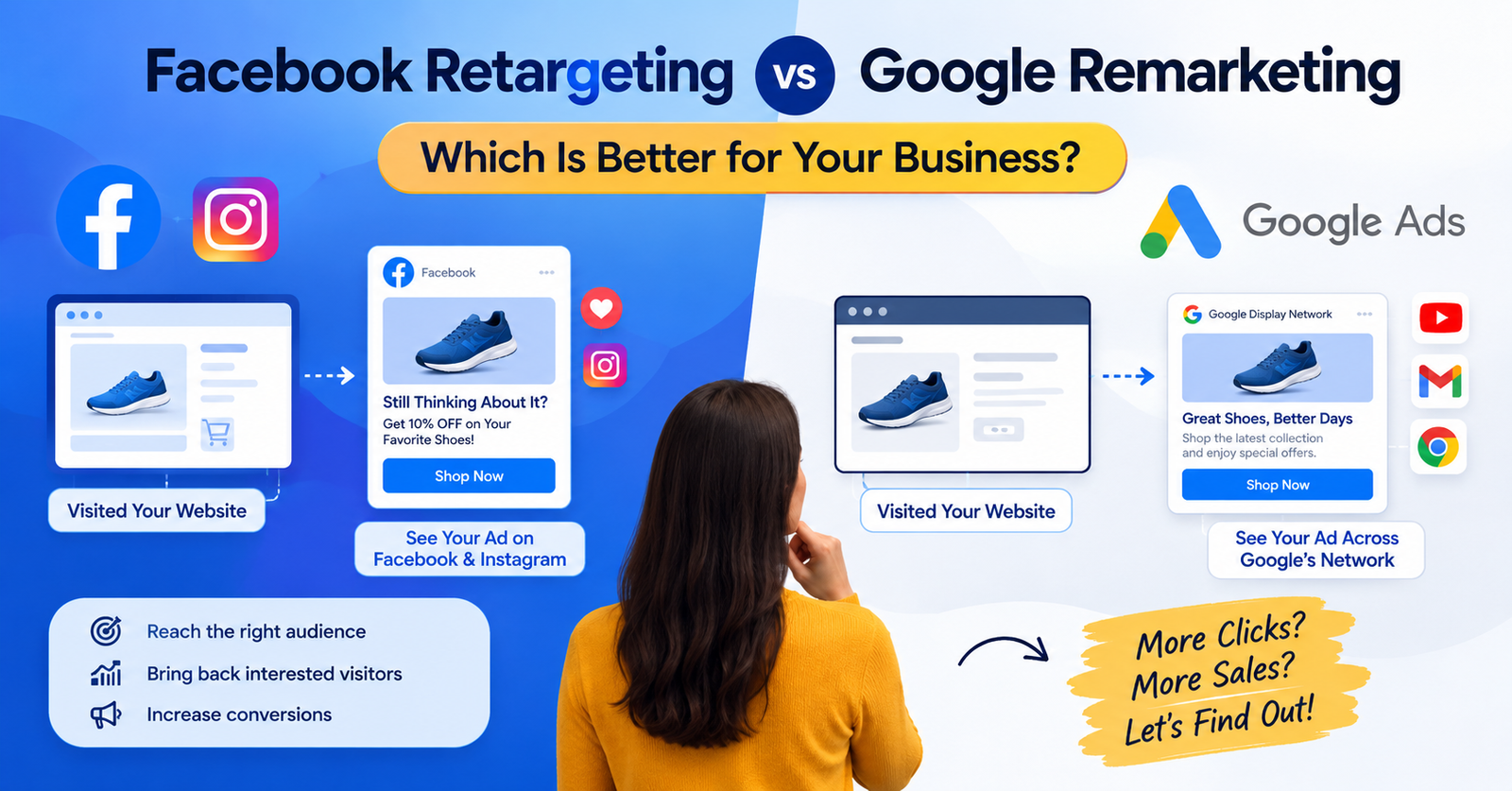
Facebook Retargeting vs Google Remarketing: Which Strategy Should You Use?
Imagine someone visits your website, looks at your product, maybe even adds it to their cart—and then leaves without buying.
That happens every day. Most website visitors don’t convert on their first visit. Instead of letting those potential customers disappear, marketers can use advertising platforms to reconnect with them. Two of the most popular options are Facebook retargeting and Google remarketing.
But which one should you use? In this guide to Facebook Retargeting vs Google Remarketing, we’ll explain how both strategies work, their key differences, advantages, disadvantages, costs, targeting options, and when to use each one.
Whether you’re a beginner, blogger, e-commerce owner, startup, or digital marketer, this comparison will help you understand which approach may fit your marketing goals.
What Is Facebook Retargeting?
Facebook retargeting is an advertising strategy that allows businesses to show ads to people who have previously interacted with their website, app, Facebook Page, Instagram account, or other digital assets.
Facebook advertising is now part of the broader Meta advertising ecosystem, which includes platforms such as Facebook and Instagram.
For example, imagine you sell shoes online.
A visitor comes to your website and looks at a pair of running shoes but doesn’t purchase them.
With a properly configured retargeting campaign, you can later show that person an advertisement featuring the same shoes or a related product while they are browsing Facebook or Instagram.
The goal is simple: Bring interested people back and encourage them to take action.
How Facebook Retargeting Works
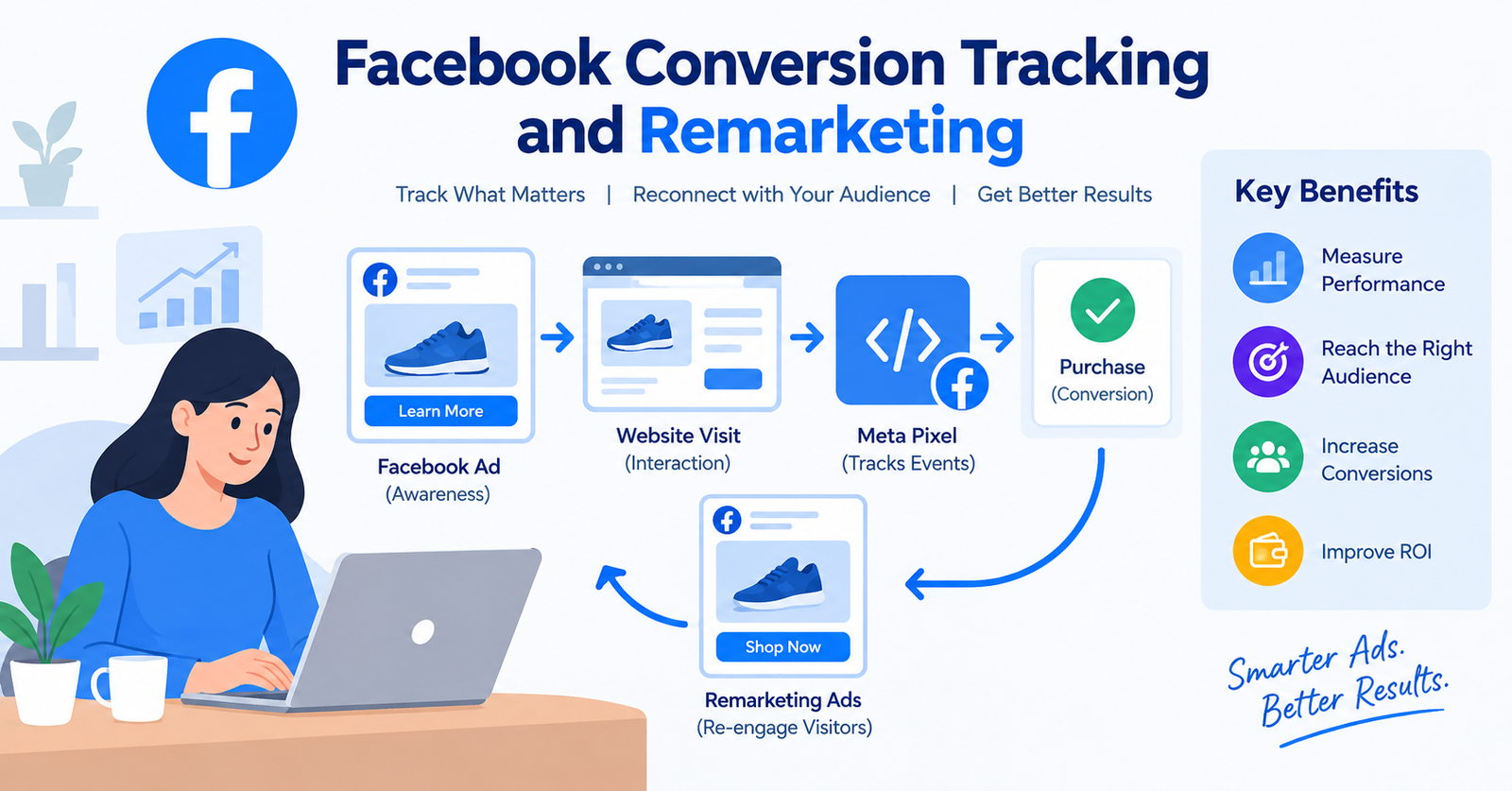
A basic Facebook retargeting process looks like this:
- A person visits your website.
- Your website records eligible advertising activity using Meta’s approved tracking technologies.
- The visitor becomes part of an eligible audience, depending on your setup and applicable privacy requirements.
- You create a retargeting campaign.
- Meta delivers ads to eligible people.
- The visitor returns to your website.
- They may eventually complete a purchase, sign up, or another desired action.
Facebook retargeting can be particularly useful for visually appealing products because Facebook and Instagram provide strong visual advertising formats.
What Is Google Remarketing?
Google remarketing is a digital advertising strategy that allows advertisers to reach people who previously interacted with their website or app through Google’s advertising ecosystem.
Depending on the campaign type and audience setup, ads can appear across Google’s available advertising inventory, including websites and apps that participate in Google’s advertising networks, as well as Google properties.
For example: Someone searches Google for best running shoes.
They visit your website and browse several products but don’t buy anything.
Later, that person may see an advertisement from your business while browsing another website or using another Google advertising-supported property.
This gives your brand another opportunity to bring the visitor back.
How Google Remarketing Works
A simplified process looks like this:
- A user visits your website.
- Your website uses Google’s measurement and advertising technologies according to your configuration.
- Eligible visitors can be included in audience lists.
- You create a Google Ads campaign.
- Google identifies eligible users and available placements.
- Your advertisements are shown to those users.
- Users may return to your website and convert.
Google also provides different campaign formats, so remarketing doesn’t have to mean only traditional display advertisements.
Facebook Retargeting vs Google Remarketing: Key Difference
The biggest difference between Facebook Retargeting vs Google Remarketing is the advertising environment and user behavior.
Facebook retargeting primarily reaches people within Meta’s ecosystem and available placements.
Google remarketing can reach users across Google’s advertising ecosystem and partner inventory, depending on the campaign and targeting settings.
Here’s a simplified comparison:
| Feature | Facebook Retargeting | Google Remarketing |
|---|---|---|
| Main ecosystem | Meta | |
| Major platforms | Facebook, Instagram | Google Ads ecosystem |
| Strong format | Visual/social ads | Display, Search-related and other Google Ads formats |
| Audience source | Website/social interactions | Website/app interactions and Google audience solutions |
| Best suited for | Social engagement and visual products | Search-driven and broader advertising journeys |
| Creative focus | Images, videos, social formats | Text, images, responsive formats, depending on campaign |
| Intent signals | Strong behavioral/social signals | Strong search and web behavior signals |
| E-commerce use | Very useful | Very useful |
| B2B use | Can be useful | Often useful for search-oriented journeys |
| Measurement | Meta Ads reporting + analytics setup | Google Ads + analytics setup |
This table provides a starting point, but your actual results depend on your audience, campaign setup, creative, landing page, budget, industry, and measurement configuration.
Facebook Retargeting vs Google Remarketing: Audience Targeting
Audience targeting is one of the most important parts of retargeting.
Both platforms provide ways to reach people who have already interacted with your business, but their ecosystems work differently.
Facebook Retargeting Audiences
Depending on available features and your setup, you can build audiences based on interactions such as:
- Website visitors
- Product viewers
- Add-to-cart users
- Purchasers
- Facebook Page interactions
- Instagram interactions
- Video engagement
- Customer lists
- App activity
For example, an online clothing store could create separate audiences for:
- People who viewed a product
- People who added a product to their cart
- People who purchased
- People who interacted with Instagram content
This allows the advertiser to create different messages for different stages of the customer journey.
Example
A person views a $100 jacket but doesn’t purchase.
Instead of showing them a generic company advertisement, the business could show a retargeting ad featuring that jacket and explain its benefits, shipping information, or current offer where permitted.
Google Remarketing Audiences
Google Ads can also support audience strategies based on previous interactions.
Examples may include:
- Website visitors
- Product viewers
- Shopping users
- Previous customers
- App users
- Specific website visitors
- Users based on relevant audience signals
For example, an online electronics store could separate visitors into groups:
Audience 1: Viewed laptops
Audience 2: Added laptops to cart
Audience 3: Purchased a laptop
The advertiser can then use different messaging for each audience.
Facebook Retargeting vs Google Remarketing: Search Intent
One major difference is the role of search intent.
Google is heavily associated with people actively searching for information, products, services, and solutions.
Imagine a user searches: Best SEO tools for small businesses.
They visit a website but don’t purchase a software subscription.
A later advertising interaction can remind that person about the business.
Facebook and Instagram work differently.
Users are generally browsing social content rather than actively searching for a product at that exact moment.
That means Facebook retargeting can be useful for maintaining awareness and encouraging users to return, while Google advertising can benefit from search-related intent depending on the campaign type.
Facebook Retargeting vs Google Remarketing for E-Commerce
E-commerce businesses often use retargeting because visitors may browse several products before purchasing.
Consider this customer journey:
- User discovers a product.
- User visits the website.
- User views three products.
- User leaves.
- User compares alternatives.
- User returns later.
- User purchases.
Facebook Retargeting for E-Commerce
Facebook and Instagram can be useful for:
- Product reminders
- Dynamic product advertising where supported
- New product promotion
- Visual storytelling
- Cart abandonment campaigns
- Customer re-engagement Instagram can be particularly relevant for visually driven categories such as fashion, beauty, lifestyle, and consumer products.
Google Remarketing for E-Commerce
Google’s ecosystem can be useful for:
- Re-engaging product visitors
- Display advertising
- Shopping-related campaigns
- Search campaigns
- Customer acquisition and retention strategies For e-commerce brands, the strongest approach may involve using multiple channels rather than relying on a single advertising platform.
Facebook Retargeting vs Google Remarketing for B2B Marketing
B2B marketing often has a longer customer journey.
A potential customer may:
- Read a blog post
- Download a guide
- Visit a pricing page
- Compare competitors
- Talk to their team
- Request a demo
- Become a customer weeks or months later
Retargeting can help maintain brand visibility during this process.
Facebook Retargeting for B2B
Facebook and Instagram can help B2B businesses reconnect with people who have already interacted with their content or website.
For example: A marketing software company publishes an article called: Complete SEO Guide for Beginners.
Someone reads the article but doesn’t sign up.
The business could use an appropriate retargeting strategy to introduce a related webinar, guide, or product.
Google Remarketing for B2B
Google can be useful when potential customers continue researching a solution.
For example: A business owner visits a CRM website but doesn’t request a demo.
Later, advertising can help bring that visitor back to the website.
For B2B, your landing page and offer are especially important because conversions may require more consideration.
Facebook Retargeting vs Google Remarketing: Ad Formats
Another important difference is creative format.
Facebook Retargeting Ad Formats
Meta advertising can provide access to formats such as:
- Image ads
- Video ads
- Carousel-style formats
- Stories
- Reels placements
- Other platform-specific formats
These formats make Facebook retargeting particularly useful when your product can be demonstrated visually.
Example
A furniture company could retarget website visitors with: Still thinking about your new sofa?
The advertisement could show the product in a realistic home environment.
Google Remarketing Ad Formats
Google advertising can provide formats such as:
- Display ads
- Responsive display ads
- Search ads
- Shopping-related formats
- Video advertising
- Other campaign-specific formats
The exact available format depends on campaign type and eligibility. Google’s strength is its broad advertising ecosystem and connection to search behavior.
Facebook Retargeting vs Google Remarketing: Cost
Many beginners ask: Which is cheaper—Facebook retargeting or Google remarketing?
There is no universal answer.
Advertising costs can vary significantly depending on:
- Industry
- Country
- Competition
- Audience size
- Campaign objective
- Ad quality
- Seasonality
- Placement
- Conversion rate
- Bidding strategy
- Budget
A campaign with a lower cost per click isn’t automatically more profitable.
For example:
Campaign A:
- CPC: $0.50
- Conversion rate: 1%
Campaign B:
- CPC: $1.00
- Conversion rate: 5%
Although Campaign B has a higher CPC, it could potentially generate more conversions relative to the traffic purchased.
That’s why businesses should look beyond CPC.
Important metrics include:
- Cost per conversion
- Conversion rate
- Return on ad spend (ROAS)
- Revenue
- Customer acquisition cost
- Lifetime customer value
Facebook Retargeting vs Google Remarketing: Which Has Better Conversion Potential?
Neither platform guarantees better conversions.
Conversion performance depends heavily on the customer journey.
For example, someone who:
- Visited your pricing page
- Read your product information
- Added a product to cart
may be more valuable as a retargeting audience than someone who simply visited your homepage.
This is why audience segmentation matters.
High-Intent Retargeting Audiences
Examples include:
- Add-to-cart users
- Checkout visitors
- Pricing-page visitors
- Product-page visitors
- Demo-page visitors
- Repeat website visitors
These audiences can often be approached with messaging designed around their stage in the buying journey.
How to Choose Between Facebook Retargeting and Google Remarketing
Instead of asking which platform is universally better, ask:
Where are my potential customers, and what are they doing before they convert?
Consider these factors.
Choose Facebook Retargeting When:
Facebook retargeting may be appropriate when:
- Your audience actively uses Facebook or Instagram.
- Your product is visually appealing.
- You have strong video or image creative.
- Social engagement is important.
- You want to reconnect with social audiences.
- You have enough eligible audience data to run meaningful campaigns.
Consider Google Remarketing When:
Google remarketing may be appropriate when:
- Your customers conduct extensive Google searches.
- Your business depends heavily on search traffic.
- You want access to Google’s broader advertising ecosystem.
- You have strong website traffic.
- Your customer journey involves research and comparison.
Can You Use Facebook Retargeting and Google Remarketing Together?
Yes. Many businesses use multiple advertising channels as part of a broader digital marketing strategy.
For example:
1: Discovery
A potential customer discovers your business through social media, search, content marketing, or another channel.
2: Website Visit
They visit your website and explore your products or services.
3: Retargeting
Your advertising campaigns reconnect with eligible visitors.
4: Conversion
The customer returns and completes the desired action.
5: Retention
You continue communicating with existing customers through appropriate marketing channels.
This multi-channel approach can help businesses avoid depending entirely on one traffic source.
Facebook Retargeting vs Google Remarketing: Example
Let’s take an example of an online digital marketing course.
A visitor lands on the website after searching: digital marketing course for beginners.
They read the course details but don’t enroll.
Facebook Retargeting Strategy
The company could create an appropriate audience of eligible website visitors and use an advertisement showing: Ready to Start Learning Digital Marketing?
The creative could highlight:
- Course modules
- Beginner-friendly lessons
- Practical projects
- Course benefits
Google Strategy
The business could use Google Ads campaigns to reconnect with eligible audiences or reach people actively searching for related solutions.
The messaging could focus on: Learn Digital Marketing Step by Step.
The landing page would then provide course information and a clear enrollment CTA.
The key lesson is that the advertisement should match the customer’s stage in the buying journey.
Common Facebook Retargeting Mistakes
Beginners often make several mistakes when launching retargeting campaigns.
1. Retargeting Everyone With the Same Ad
Someone who visited your homepage isn’t necessarily at the same stage as someone who abandoned checkout.
Segment audiences where appropriate.
2. Showing Ads Too Frequently
Repeatedly showing the same advertisement can create ad fatigue.
Monitor frequency and campaign performance.
3. Using Weak Creative
Retargeting doesn’t automatically make a bad advertisement effective.
Your creative still needs a strong message.
4. Ignoring Landing Pages
A good advertisement cannot fix a poor landing page.
Make sure the landing page:
- Loads quickly
- Works on mobile
- Matches the advertisement
- Explains the offer clearly
- Has a visible CTA
Common Google Remarketing Mistakes
1. Poor Audience Segmentation
Separate visitors based on meaningful actions whenever possible.
2. Tracking Problems
If measurement isn’t configured correctly, your audience and conversion data may not reflect actual user activity.
3. Weak Ad Messaging
A generic advertisement may not give previous visitors a reason to return.
4. Ignoring Conversion Tracking
Without reliable conversion measurement, it becomes difficult to understand whether your campaigns are actually producing business results.
Privacy and Tracking Considerations
Digital advertising has become increasingly privacy-focused.
Advertisers should follow:
- Applicable privacy laws
- Platform policies
- Consent requirements
- Data protection requirements
- Cookie and tracking rules relevant to their audience
Tracking availability can also vary depending on browser settings, device restrictions, consent choices, platform policies, and technical implementation.
Therefore, don’t assume that every website visitor can always be identified or retargeted.
For businesses operating internationally, privacy requirements can be particularly important.
How to Create a Retargeting Strategy
If you’re a beginner, follow this simple framework.
Creating an effective retargeting strategy doesn’t have to be complicated. The key is to understand your audience, define a clear goal, create relevant advertisements, and continuously improve your campaigns based on performance data.
Whether you’re using Facebook retargeting, Google remarketing, or both, the following steps can help you build a structured strategy.
1: Define Your Goal
Decide what you want visitors to do.Before starting a Facebook retargeting or Google remarketing campaign, clearly define what you want your audience to do. A specific goal makes it easier to choose the right campaign setup, audience, advertisement, landing page, and performance metrics.
Examples:
- Buy a product
- Request a quote
- Book a demo
- Sign up
- Download a resource
- Contact your business
2: Identify Your Audiences
Create logical audience groups. Before launching a retargeting campaign, you need to identify who you want to reach. Not every website visitor has the same level of interest or the same reason for visiting your website. Segmenting visitors into meaningful audiences allows you to create more relevant advertisements and landing pages.
For example:
- All visitors
- Product viewers
- Cart abandoners
- Pricing-page visitors
- Previous customers
3: Create Relevant Ads
Your advertisement should answer:Creating relevant advertisements is one of the most important parts of a successful retargeting campaign. People who have already visited your website have shown some level of interest, so your ads should reflect their previous interaction rather than showing the same generic message to everyone.
Why should this visitor come back?
Possible reasons include:
- Product benefits
- New information
- Social proof
- Useful content
- Limited-time promotion where appropriate
- Free consultation
- Demo or trial
4: Use a Strong Landing Page
Keep the experience consistent from advertisement to landing page.A strong landing page is essential for turning retargeted visitors into customers. Someone may click your Facebook retargeting or Google remarketing ad, but if the landing page is slow, confusing, or unrelated to the advertisement, they may leave without converting.
5: Measure Results
Track metrics such as:Running Facebook retargeting or Google remarketing campaigns without measuring results makes it difficult to know what is actually working. Tracking the right metrics helps you understand how users interact with your ads and whether your campaigns are generating meaningful business results.
- Impressions
- Clicks
- CTR
- CPC
- Conversions
- Conversion rate
- CPA
- ROAS
6: Test and Improve
Test:A successful retargeting campaign usually requires continuous testing and optimization. Instead of assuming that one advertisement will work perfectly, test different elements and use your campaign data to understand what performs better.
- Headlines
- Images
- Videos
- CTAs
- Audience segments
- Landing pages
- Offers
Then use your actual campaign data to decide what to adjust.
Facebook Retargeting vs Google Remarketing: Final Comparison
The debate around Facebook Retargeting vs Google Remarketing shouldn’t be about finding one universal winner.
Both platforms can play different roles.
Facebook retargeting can be valuable for businesses that rely heavily on visual content, social engagement, and Meta’s audience ecosystem.
Google remarketing can be valuable for businesses whose customers spend significant time researching products, services, and solutions through Google’s ecosystem.
Your decision should be based on:
- Target audience
- Customer journey
- Advertising objective
- Available creative
- Website traffic
- Conversion data
- Budget
- Industry
- Geographic market
For some businesses, using both can create a broader retargeting strategy.
Frequently Asked Questions
Is Facebook retargeting the same as Google remarketing?
No. Both are strategies for reconnecting with previous website or customer interactions, but they operate within different advertising ecosystems and use different targeting and placement systems.
Which is better for e-commerce?
Both can be useful for e-commerce. Facebook retargeting can work well with visual product advertising, while Google can provide opportunities across search and its broader advertising ecosystem.
Is Facebook retargeting expensive?
Costs vary depending on factors such as competition, audience, country, campaign objective, creative quality, and bidding strategy. There is no fixed cost.
Is Google remarketing free?
Creating an audience doesn’t mean advertising itself is free. When you run paid Google Ads campaigns, costs depend on the campaign type, bidding, competition, and other factors.
How long should I run a retargeting campaign?
There isn’t one ideal duration. It depends on your customer buying cycle, audience size, campaign performance, and business objectives.
Can I use Facebook retargeting and Google remarketing together?
Yes. Businesses can use both platforms as part of a broader multi-channel advertising strategy, provided their tracking, consent, audience, and campaign setup comply with applicable requirements.
Does retargeting guarantee sales?
No. Retargeting can help reconnect with interested users, but it doesn’t guarantee conversions. Product quality, pricing, landing pages, customer intent, creative, trust, and many other factors influence sales.
Conclusion: Facebook Retargeting vs Google Remarketing
When comparing Facebook Retargeting vs Google Remarketing, the most important thing to remember is that they aren’t simply competing tools.
They can serve different purposes within the same customer journey.
Facebook retargeting can help businesses reconnect with people through Meta’s social ecosystem and visually engaging advertising formats. Google remarketing can help advertisers reconnect with eligible audiences through Google’s advertising ecosystem and search-related marketing strategies.
The right strategy depends on your:
- Audience
- Industry
- Customer journey
- Marketing goals
- Budget
- Website traffic
- Conversion data
If you’re just getting started, don’t try to launch complicated campaigns immediately.
Start with one clearly defined audience, one conversion goal, a strong landing page, and a small test budget. Measure the results carefully, learn from the data, and gradually improve your campaigns.