Google Ads Quality Score Explained: The Complete Beginner’s Guide (2026)
Introduction
If you’ve ever launched a Google Ads campaign and wondered why some advertisers pay less while still appearing above your ads, the answer often comes down to Quality Score.
Many beginners focus only on increasing their budget, but Google doesn’t simply reward the highest bidder. Instead, it evaluates how useful and relevant your ads are to users. This evaluation is called Quality Score.
Understanding Google Ads Quality Score can help you reduce advertising costs, improve your ad positions, increase click-through rates (CTR), and generate more conversions without spending more money.
In this guide, you’ll learn everything you need to know about Google Ads Quality Score, including how it works, what affects it, and practical ways to improve it.
What Is Google Ads Quality Score?
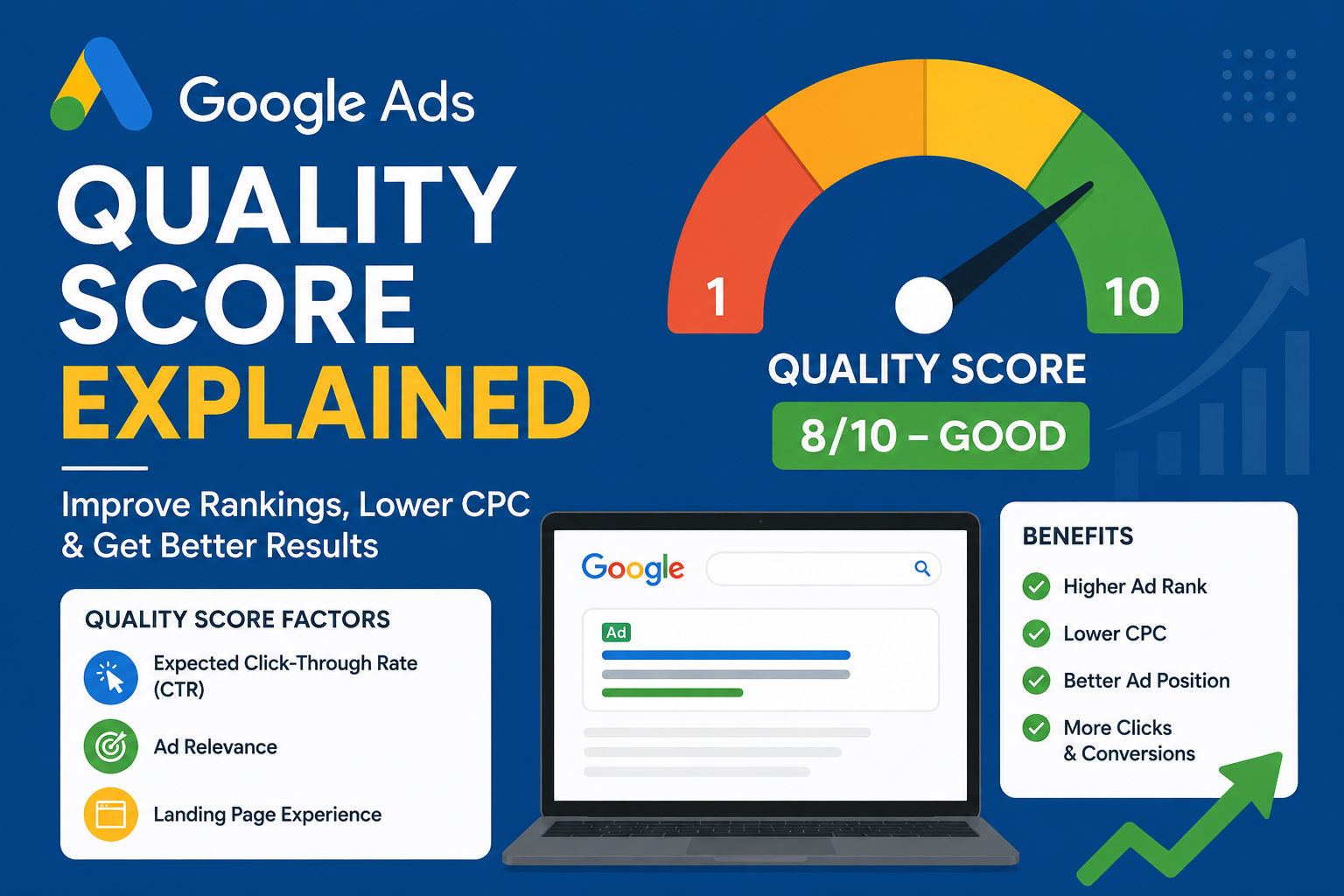
Google Ads Quality Score is a rating from 1 to 10 that estimates the overall quality and relevance of your keywords, ads, and landing pages.
A higher score means Google considers your ad more useful for users searching that keyword.
Generally:
| Score | Meaning |
|---|---|
| 1-3 | Poor Quality |
| 4-6 | Average |
| 7-8 | Good |
| 9-10 | Excellent |
Why Is Quality Score Important?
If you’re running Google Ads, you’ve probably heard about Quality Score. Many beginners focus only on increasing their budget or bidding higher, but experienced advertisers know that Quality Score is one of the biggest factors behind successful campaigns.
A high Quality Score doesn’t just improve your ad rankings—it also helps reduce advertising costs, increase click-through rates, and improve your return on investment (ROI).
How Does Google Calculate Quality Score?
If you’ve ever managed a Google Ads campaign, you’ve probably noticed a metric called Quality Score. Many advertisers think Google simply assigns a number based on how much they bid, but that’s not how it works.
Google calculates Quality Score by evaluating how useful and relevant your ads are to users. Instead of rewarding the highest bidder, Google wants to display ads that provide the best experience for people searching online.
A high Quality Score can help you achieve:
- Lower Cost Per Click (CPC)
- Better Ad Rankings
- Higher Click-Through Rates (CTR)
- More Website Traffic
- Increased Conversions
- Better Return on Investment (ROI)
1. Expected Click-Through Rate (CTR)
This predicts how likely users are to click your ad when it appears.
Google considers:
- Historical keyword performance
- Past ad performance
- Similar advertisers
- User search behavior
2. Ad Relevance
Google checks whether your advertisement closely matches the user’s search query.
For example:
Search: Best Running Shoes
Good Ad ;Buy Lightweight Running Shoes
Free Shipping Available
Poor Ad; Buy Sports Products Today
3. Landing Page Experience
Landing Page Experience is one of the three most important factors Google uses when evaluating your Quality Score. It measures what happens after someone clicks your ad and lands on your website. Google wants users to have a smooth, helpful, and trustworthy experience, not just click an ad.
Think of it this way: your ad is a promise, and your landing page should deliver on that promise. If your ad promotes a specific product, service, or offer, visitors should immediately find that information when they arrive on the page. When the landing page matches the user’s expectations, they’re more likely to stay, engage, and convert.
What Is Ad Rank?
Ad Rank is the value Google calculates during every ad auction to determine your ad’s position on the search results page.
Many advertisers believe Ad Rank is based only on the amount they bid. In reality, Google evaluates several factors to ensure users see ads that are both useful and relevant.
A higher Ad Rank generally gives your ad a better chance of appearing in prominent positions, although Google may also decide not to show an ad if it doesn’t meet minimum quality thresholds.
Where Can You Find Quality Score in Google Ads?
Quality Score is available at the keyword level, meaning you’ll see a separate score for each keyword rather than one score for an entire campaign or account.
Follow these simple steps to locate it.
1: Sign in to Google Ads
Log in to your Google Ads account using the email address associated with your campaigns.
2: Open Your Campaign
From the left-hand menu, select the campaign you want to analyze.
If you have multiple campaigns, choose the one you’d like to review.
3: Click on Keywords
In the left navigation panel, click Keywords.
This section displays all the keywords you’re targeting within the selected campaign.
4: Customize the Columns By default, the Quality Score column isn’t shown.
To add it:
- Click the Columns icon above the keywords table.
- Select Modify columns.
- Expand the Quality Score section.
- Choose the metrics you want to display.
Common Reasons for a Low Quality Score (And How to Fix Them)
A low Quality Score is one of the most common reasons why Google Ads campaigns struggle to deliver good results. If your ads have a low Quality Score, you may notice higher Cost Per Click (CPC), lower ad positions, fewer impressions, and reduced conversions.
The good news is that a low Quality Score is not permanent. By understanding the reasons behind it and making targeted improvements, you can boost your campaign performance and get more value from your advertising budget.
Let’s explore the most common reasons for a low Quality Score and how you can fix each one.
How to Improve Google Ads Quality Score
A high Google Ads Quality Score can make a huge difference in the success of your advertising campaigns. It can help you achieve better ad positions, lower your Cost Per Click (CPC), and increase conversions—all without significantly increasing your budget.
Many advertisers assume that simply raising their bids will improve performance. However, Google rewards advertisers who create relevant ads, choose the right keywords, and provide a great landing page experience.
The good news is that improving your Quality Score isn’t complicated. By making a series of smart optimizations, you can gradually increase your score and build more effective Google Ads campaigns.
In this guide, we’ll explore practical strategies that can help improve your Google Ads Quality Score and deliver better long-term results.
1. Use Highly Relevant Keywords
2. Write Better Ads
3. Improve Landing Pages
4. Increase Click-Through Rate
5. Use Negative Keywords
6. Organize Ad Groups
7. Optimize for Mobile
8. Test Multiple Ads
Mistakes to Avoid When Improving Google Ads Quality Score
Improving your Google Ads Quality Score takes more than increasing your bid or adding a few keywords. Many advertisers unknowingly make mistakes that reduce ad performance, increase advertising costs, and lower conversion rates.
The good news is that most of these mistakes are easy to fix once you know what to look for. By avoiding the common pitfalls below, you can improve your Quality Score, reduce your Cost Per Click (CPC), and build campaigns that deliver better results over time.
Common mistakes include:
- Ignoring Quality Score
- Sending traffic to the homepage instead of a relevant page
- Using broad keywords without review
- Writing vague ad copy
- Failing to improve landing pages
- Not reviewing search terms
- Forgetting negative keywords
- Using a single ad for many unrelated keywords
Quality Score Best Practices
A strong Quality Score is one of the biggest advantages you can have in Google Ads. It doesn’t just help your ads rank higher—it can also reduce your Cost Per Click (CPC), improve your Ad Rank, and increase your Return on Investment (ROI).
Many advertisers focus only on increasing their bids, but Google’s advertising system rewards campaigns that provide the best experience for users. That’s why following Quality Score best practices is essential if you want to run successful and cost-effective campaigns.
In this guide, you’ll learn the most effective practices to improve your Quality Score and maximize the performance of your Google Ads campaigns.
Quality Score Best Practices Checklist
Use this checklist whenever you create or optimize a Google Ads campaign:
- Research relevant keywords with clear search intent.
- Create small, tightly themed ad groups.
- Write keyword-focused, compelling ad copy.
- Include keywords naturally in headlines and descriptions.
- Match your landing page to your ad’s message.
- Improve website speed and performance.
- Ensure your landing page is mobile-friendly.
- Add negative keywords to filter irrelevant traffic.
- Use Google Ads assets to enhance your ads.
- Test multiple ad variations and analyze results.
- Monitor Quality Score and campaign metrics regularly.
- Continuously optimize based on performance data.